This post may contain affiliate links. I only recommend tools I actually use.
There’s a lot of productivity advice out there. Most of it survives a Pinterest screenshot and dies the first time you try it. This is the version of the post I’d send to a friend who just started working from home and asked what actually held up.
Five habits. None of them are clever. All of them are things I still do, two years in. And I’m honest about the ones that didn’t work.
If you’re reading this looking for the silver bullet, there isn’t one. The trick isn’t a system. The trick is keeping a small number of things going for long enough that they compound.
1. Pick three things, not ten
Every productivity post tells you to “prioritise”. Then they hand you a 12-quadrant matrix and a colour-coded calendar, and you spend Monday morning planning instead of working.
Here’s the actual rule. Before you close your laptop at the end of the day, write tomorrow’s three priorities on a sticky note. Not five. Not ten. Three. Stick it on your monitor or next to your keyboard.
Tomorrow morning, those are the only three things you’re allowed to feel good about finishing. Everything else is bonus.
The reason this works is that the limit forces honesty. When you have ten priorities, none of them are priorities. When you have three, you can’t hide. By Tuesday afternoon you’ll know which one you’ve been avoiding, and that’s the one you do next.
I’ve tried the Eisenhower matrix. I’ve tried the “MIT” framework. I’ve tried time-blocking my entire week. They all ended up as theatre. The sticky note works because it can’t be edited at 11am when something easier comes along.
Pomodoro is decent, but only for the right tasks. 25 minutes on, 5 minutes off, four rounds, longer break. It’s good for shallow tasks: emails, admin, expenses, anything where you’d otherwise procrastinate. It’s bad for deep work, where the first 30 minutes are spent loading the problem into your head. Don’t pomodoro your way through writing, design, or anything that requires real thinking. Honest about it.
2. Build a workspace you want to sit at
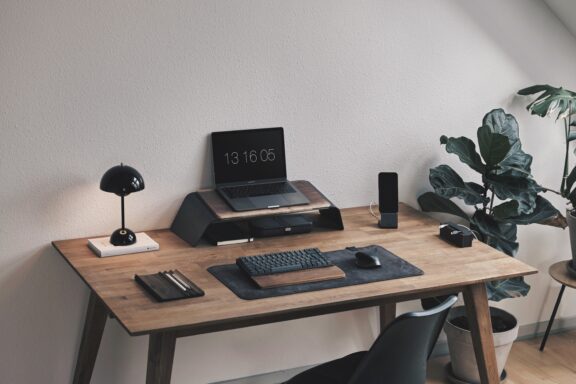
Your desk is the single most important productivity tool you own. It shapes whether you sit down willingly each morning or have to force yourself.
This is treated like a luxury question, but it’s not. A bad desk setup costs you a hidden 20 to 30 minutes a day in low-grade friction: sore back, awkward laptop angle, screen glare, cluttered surface. Multiply that across a year and it’s a working week.
A few things that move the needle most:
- Light from the right side if you’re right-handed (the left if you’re left-handed). Your hand doesn’t shadow what you’re writing or reading.
- The screen at eye level, not below it. A laptop on a table without a stand is the single fastest way to give yourself neck strain. A stack of books works if you don’t want to spend money.
- One designated surface for “working”. If you work from the kitchen table, the surface needs to clear and reset every morning. Coffee mug, laptop, notebook. That’s the working mode trigger.
I went deep on this in the desk setup guide, including specific gear that’s actually worth buying. If you’re still working from a sofa or your bed, that’s the post to read first.
The thing nobody mentions: the chair matters more than the desk. A bad chair you sit in for eight hours makes everything else worse. If your budget is tight, fix the chair before anything else.
3. Use fewer tools, not more
The productivity tool trap is real and almost universal. You feel unproductive, so you download a new app. You spend Saturday setting up the new app. Monday you use it three times. By Friday you’ve forgotten about it. Repeat next month with a different app.
The honest stack for working from home, after years of trying everything:
- Notion as the single hub for notes, projects, and reference
- A calendar (the one already on your phone is fine)
- A timer (your phone has one)
- An AI assistant if you write a lot. ChatGPT, Claude, or whichever fits.
If you want a guide to which AI tools are actually worth using, the AI tools post covers the five worth knowing. If you write a lot of work emails, the ChatGPT for emails post is the tactical follow-up.
Notion is the one productivity tool I’d actually recommend committing to. It replaces what would otherwise be three or four separate apps: notes, project lists, calendars, references, briefs. Everything in one place, searchable, properly linked. Once it’s set up, you stop losing 20 minutes a day hunting for something you wrote down last week.
The setup takes a couple of hours. Start simple: a page for active projects, a page for notes, a page for things to come back to later. Don’t build elaborate templates until you’ve used the basics for a few weeks and actually know what structure you need. The free tier covers most personal and small-team use cases. Worth it from day one.
Zapier is the right tool once you have a real use case for automation. Don’t set it up before you’ve identified a specific repetitive task that’s costing you 30+ minutes a week. Setting up automation for hypothetical efficiency is a great way to waste an afternoon. Once you have the use case though (forwarding emails to a project tool, syncing calendar events, auto-saving attachments to cloud storage, sending Slack notifications when something specific happens), the time it gives you back compounds fast.
The free tier handles 100 tasks per month, which covers most light personal automation. Paid tiers start at around $20/month and only make sense if you’re running automations that genuinely save you more than that in time.
The principle: tools are a tax. Pay them only when the saved time genuinely exceeds the maintenance cost. Notion earns its tax. Most other apps don’t.
4. Track showing up, not outcomes
Habits stick when you make them small enough that you can’t fail. They break when you set the bar too high and miss two days in a row.
The single most useful thing I’ve found: a column in my notes app, dated, where I tick a box for the day’s keystone habit. That’s it. Not a habit-tracking app, not a journal, not a mindfulness practice. A column.
Example, the simplest possible version:
| Date | Done? | Note |
|---|---|---|
| 04/05/2026 | ✓ | Wrote for an hour |
| 05/05/2026 | ✗ | Had to travel |
| 06/05/2026 | ✓ | Short session, still counts |
The trick is that the question isn’t “did I do it well?” It’s “did I do it at all?” A 15-minute writing session counts the same as a 90-minute one. You’re tracking the chain, not the quality.
Two months in, you’ll find you don’t want to break the chain. That’s when the habit has stuck.
The thing that never works: tracking too many habits at once. Pick one. Build it for two months. Then add another. Most people fail because they try to install five new habits in January.
If you want a framework for what a sustainable working day actually looks like (not just what to track), I’m writing a longer post on that next.
5. Stop at 5pm even when you don’t want to
This is the hardest WFH habit to build, and the one nobody wants to hear about.
When you don’t have a commute, work bleeds into evenings. You finish dinner and think you’ll just answer one email. Three hours later you’re still on the laptop. By Friday you’ve worked 55 hours and don’t know where Tuesday went.
The fix isn’t willpower. It’s a hard signal that says the working day is over.
Things that work:
- A walk at 5pm that doesn’t involve your phone. Even ten minutes around the block.
- Closing the laptop and putting it in a drawer or another room. Out of sight is out of mind.
- Different chair for evenings. Your work chair is for work. The sofa is for evenings. Don’t mix them.
- A “shutdown ritual” that takes two minutes: write tomorrow’s three priorities (see habit one), close the tabs, close the laptop. The act of doing this consistently teaches your brain to clock off.
I covered the bigger picture of why WFH burnout happens and what’s changing about how we work in The Future of Remote Work Has Started. The short version: without environmental cues to end the day, you have to build them yourself.
Burnout is the failure mode of “just one more thing”. The early signs are subtle: dreading Monday by Sunday afternoon, a flat feeling about work that used to be interesting, sleeping badly. If two of those are showing up, you’re not lazy. You’re cooked. Take a long weekend before it gets worse.
What to do tomorrow
Pick one of the five. Not all five. The whole point is consistency.
If I had to choose for you: start with habit one (three things on a sticky note) because it’s the one with the highest payoff for the least effort. You can implement it in 30 seconds. You’ll see the difference within a week.
The goal here isn’t to optimise yourself. It’s to do meaningful work during the day and actually have a life left over in the evening. Every habit on this list is in service of that.
If you want the desk gear that supports all of this, the desk setup guide is the next read. If you want the AI tools that take admin off your plate so you have more time for real work, start with the AI tools post.
The five habits above are the ones I still do. They’re not the ones I tried and quit. That’s the only filter that matters.